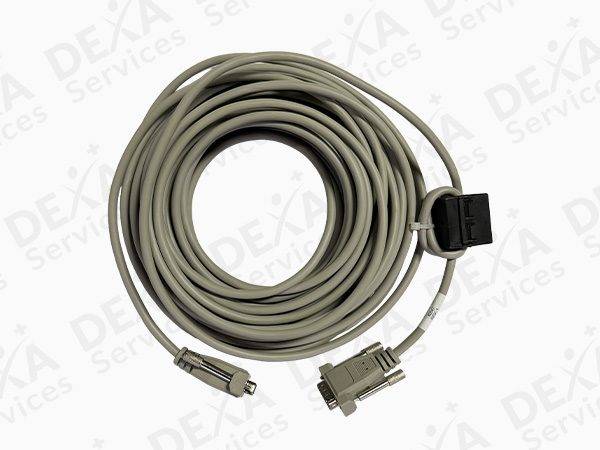
Overview of the LNR42647 RS-232 Cable
The LNR42647 & LU42647 RS-232 Serial Cable is a critical communication component designed for GE Prodigy DXA systems. This 50-foot host I/O cable enables stable and accurate data transmission between the DXA scanner and its connected workstation or control interface. In environments where precision and consistency are essential, maintaining reliable communication between system components is non-negotiable.
Over time, serial cables can degrade due to repeated handling, environmental exposure, and general wear. Signal interference, connection instability, or physical damage can lead to communication errors that disrupt workflow and compromise system performance. Replacing aging or faulty cables with the LNR42647 RS-232 Cable ensures that your system continues to operate efficiently and without interruption.
This cable is specifically engineered to meet the requirements of GE Prodigy systems, offering OEM-compatible performance and seamless integration. Its 50-foot length provides flexibility in equipment layout, making it suitable for a variety of clinical and imaging environments.
Key Features / Benefits of the LNR42647 RS-232 Cable
Ensures Reliable Data Communication
The primary function of the LNR42647 RS-232 Cable is to facilitate consistent and accurate data transfer between system components. Reliable communication is essential for maintaining system responsiveness, preventing data errors, and ensuring smooth operation during scans.
Integrated Ferrite for Noise Suppression
Electromagnetic interference (EMI) can negatively impact signal quality, particularly in environments with multiple electronic devices. This cable includes a built-in ferrite core that reduces noise and interference, helping maintain clean and stable signal transmission.
Extended 50-Foot Length for Flexible Installation
The 50-foot cable length allows facilities to configure their DXA systems according to space requirements without compromising connectivity. Whether your workstation is positioned nearby or at a distance, this cable provides the reach needed for optimal setup.
OEM-Compatible Design
Designed to match the specifications of GE Prodigy DXA systems, this cable ensures proper connectivity without the need for modifications. Its compatibility helps maintain system calibration and avoids communication mismatches that can occur with generic cables.
Durable Construction for Clinical Environments
Built for durability, the LNR42647 RS-232 Cable is designed to withstand daily use in medical and imaging facilities. Its robust construction helps prevent wear-related failures, reducing the need for frequent replacements.
Essential for Refurbished System Performance
For facilities operating refurbished GE Prodigy systems, ensuring that all communication components are functioning properly is critical. A high-quality serial cable like the LNR42647 & LU42647 supports reliable system operation and helps extend the life of your equipment.
Importance of Reliable Serial Communication in DXA Systems
DXA systems rely on seamless communication between hardware and software components to function properly. The RS-232 interface remains a standard communication protocol in many medical imaging systems due to its reliability and simplicity. However, its performance depends heavily on cable integrity.
A compromised cable can result in delayed responses, incomplete data transmission, or system errors. In busy clinical settings, these issues can disrupt workflow, increase downtime, and affect overall productivity. By replacing worn or unreliable cables with a properly specified part like the LNR42647 RS-232 Cable, facilities can avoid these challenges and maintain operational efficiency.
Applications
The LNR42647 & LU42647 RS-232 Cable is ideal for:
- GE Prodigy DXA system connectivity
- Host-to-system communication interfaces
- Refurbished DXA system maintenance
- Imaging centers and diagnostic facilities
- Mobile or custom-configured DXA setups